Migrate to Webflow from any platform
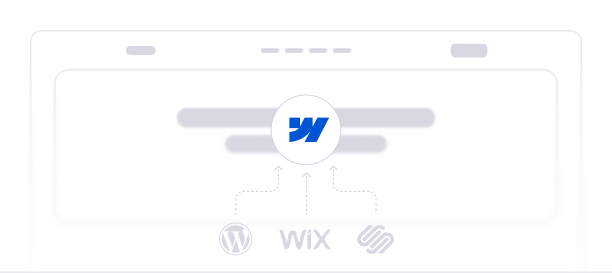
We migrate websites from WordPress, Wix, Squarespace, Framer, Adobe XD, and custom CMS platforms to Webflow with SEO rankings preserved, content transferred cleanly, and design refined where it matters. Trusted by 150+ companies across 15+ countries.


























Why companies migrate to Webflow
Migration is rarely about wanting a new website — it's about hitting a wall with the current one. The teams who reach out to us are usually dealing with one or more of these:

Speed and Core Web Vitals
WordPress and older custom builds slow down as plugins and code accumulate. Webflow's clean output and CDN-backed hosting consistently outperform most legacy platforms on Core Web Vitals — directly impacting search rankings and conversion rates.

Marketing independence from developers
On WordPress or custom-coded sites, every content update needs developer time. Webflow gives marketing teams the ability to publish, update, and ship without filing tickets. The day-to-day cost of running the site drops sharply.

Maintenance overhead
Plugin updates, security patches, hosting renewals, broken integrations after updates — these add up to hours per month on platforms like WordPress. Webflow handles security, hosting, and platform updates automatically.

Design control without custom code
Builders like Wix and Squarespace are template-locked. Custom-coded sites are flexible but expensive to update. Webflow gives you visual design freedom without the engineering tax — which matters when your brand or positioning evolves.
Top-Rated Webflow Migrations
Whether you're moving from another CMS or redesigning your website, our Webflow migration experts ensure a smooth and seamless transition with our top-notch website migration services.


What we get right that most migrations get wrong
Bad migrations cost rankings, traffic, and revenue. Here's how we prevent each common failure point.

SEO rankings preserved, not just promised
We don't just say "SEO-safe migration." We map every existing URL to its new destination, set up 301 redirects before launch, validate the redirect chain, and monitor Search Console for 30 days post-launch.

Content transferred cleanly, not copy-pasted
For sites with 100+ pages or CMS-heavy structures, we use scripts to migrate content with formatting, images, metadata, and internal links intact not manual copy-paste that breaks half the time.

No design regression
The new Webflow site looks at least as good as the old one — usually better. We never ship a migration where the new version is visually worse than what it replaced.
Zero ranking loss windows
Most migrations introduce a 2–4 week traffic dip while Google re-crawls. Our pre-launch redirect setup and structured data preservation cut this to days, not weeks. We track this in Search Console and share weekly reports.

Pre-migration SEO audit included
Before any migration, we audit your current site for SEO issues already there — broken links, missing schema, weak meta tags, indexation problems. Migration is the right time to fix these, not perpetuate them.

Post-launch monitoring, not handover-and-disappear
Every migration includes 30 days of post-launch monitoring. We watch rankings, fix anything that breaks, handle Google Search Console alerts, and tune Webflow performance until it's clean.
Our Recent Webflow Projects


Webflow

Figma + Webflow

Webflow

Figma + Webflow

Webflow

Webflow

Webflow

Webflow

Webflow

Figma + Webflow


How we rebuild your website on Webflow
Transparent process. Clear milestones. No surprises.
Pre-migration audit
We audit your current site: pages, URL structure, traffic-driving content, existing SEO issues, plugin dependencies, content formats, and integrations. You get a written migration plan before any work starts.
Migration plan + URL mapping
We map every existing URL to its new destination, document content transfer rules, set up the redirect plan, and identify what to keep, kill, or rebuild. You approve this before development begins.
Webflow build + content transfer
We build the new Webflow site (rebuild or lift-and-shift), transfer content cleanly, set up CMS structures, and integrate analytics, forms, and external tools.
Test, redirect, launch, monitor
Full QA across browsers and devices. Redirects validated and tested before launch. Launch day with us on Slack. 30 days of post-launch monitoring in Google Search Console — tracking rankings, fixing anything that breaks.
Frequently asked questions about website migration
Have a different question? Book a Call
What is Webflow migration?

Webflow migration is the process of moving an existing website from another platform — WordPress, Wix, Squarespace, Framer, Adobe XD, or custom CMS — to the Webflow platform. A proper migration includes content transfer, URL mapping, 301 redirects to preserve SEO, design recreation or refresh, integration setup, and post-launch monitoring. The goal is moving to Webflow without losing rankings, traffic, or data.
How long does a Webflow migration take?
Most Webflow migrations take 2 to 8 weeks. A simple 10–20 page lift-and-shift migration takes about 2–4 weeks. A full migration with redesign on a 50+ page site typically takes 4–8 weeks. Complex migrations with custom integrations or large content volumes can take longer. You get a clear timeline as part of the proposal.
Will my SEO rankings drop during a Webflow migration?
A properly executed migration causes minimal ranking impact — usually a few days of slight fluctuation, not a permanent drop. The keys are pre-mapping every URL to its new destination, setting up 301 redirects before launch, preserving on-page SEO elements (titles, meta descriptions, schema, headings), and monitoring Google Search Console for 30 days post-launch. Botched migrations can lose 30–60% of organic traffic; well-planned ones recover within weeks.
How much does a Webflow migration cost?
Webflow migration projects with theCSS Agency start at $2,500. Cost depends on number of pages, source platform complexity, whether you need a redesign alongside the migration, content volume, and integrations. We share a fixed scope and price after a discovery call — no hourly billing.
Can you migrate my custom-coded website to Webflow?
Yes. We migrate from custom-coded sites, internal CMSs, headless setups, and unusual platforms. Custom migrations typically need a longer discovery call to scope properly because every codebase is different. We document existing content, recreate the site in Webflow, and set up the migration with the same SEO and integration handling as standard migrations.
Should I migrate to Webflow if my current site is performing well?
Probably not, unless you're hitting one of the common walls: marketing team blocked by developers, plugin maintenance overhead, slow Core Web Vitals, or design lock-in from a templated builder. Migration is justified by what it solves operationally and strategically — not by Webflow being a better platform in the abstract.
Do you migrate ecommerce sites to Webflow?
Yes, but with caveats. Webflow's native ecommerce works well for stores with up to a few hundred products. For larger Shopify, WooCommerce, or BigCommerce stores, we typically migrate the marketing site to Webflow while keeping the storefront on the dedicated ecommerce platform — connected via subdomain or path. We discuss the right approach for your case during the discovery call.
What happens after the Webflow migration is launched?
Every migration includes 30 days of post-launch support. We monitor Google Search Console for indexation issues, watch for ranking drops, fix anything that breaks, validate redirects, and tune performance. After 30 days, you can continue with our Webflow Maintenance service or manage the site independently. We also train your team on managing the Webflow site before handover.
How long will it take to migrate my website to Webflow?
It will take 12-15 days from the date you share all the required information with us. The timeline is dependent on the number of pages, amount of content and other factors.
Customers Love Our Work!
Our clients trust us to turn their digital ideas into high-performing websites that drive engagement and growth. Be a part of the businesses that have elevated their online presence with our unlimited Webflow development.

I was looking for Webflow design agency and found them online. They helped me re-brand my entire website in Webflow. Being in the real-estate industry, it is important for us to showcase our latest and upcoming projects.

The branding materials theCSS Agency has developed perfectly reflect our company — We have received a lot of positive feedback about the new logo and website design. theCSS Agency has managed projects well, factoring edit requests into project timelines to ensure deadlines are met.

They have simply done magic with our brand. Starting from logo redesign to taking our brand identity to the next level, and to redesigning a minimalistic, website; it’s absolutely commendable.

They were very quick, had great communication, were highly responsive, and had excellent quality of work. theCSS Agency launched the landing pages within a week and quickly addressed additional tweaks. The team was highly responsive, delivered on time, and provided support and guidance on how to create more variants or make future changes.

What’s been especially impressive is their efficiency and ability to execute quickly without sacrificing quality. theCSS Agency has been responsive and timely despite the time difference. Their project management skills have made collaboration easy and efficient. Moreover, their ability to execute tasks quickly without compromising quality.

We were most impressed by theCSS Agency's creative design skills and deep Webflow knowledge. theCSS Agency's efforts have improved the client's website performance, resulting in a 30% increase in average session duration, a 12% reduction in bounce rate, and a 15% increase in organic traffic.

They show quick delivery and openness to try suggestions. Thanks to theCSS Agency's efforts, the client has obtained a new website with improved aesthetics. The team provides timely deliverables and has demonstrated excellent coordination throughout the engagement.

They're very professional as a working vendor and are very open and transparent with the work that is being done. theCSS Agency delivered milestones on time, including the main web page, locations page, editorial web templates, and the website migration. The team communicated via Asana and web meetings.

theCSS Agency team did a great job troubleshooting and updating the design of my Webflow website. He's very easy to work with and very communicative. I will continue to work with him in the future.

theCSS Agency delivered the project on time and to the client's expectations. The vendor ensured excellent communication via email, Slack, and WhatsApp. The client was delighted with their knowledge and proactive and accommodating approach.

Thanks to TheCSS Agency’s work, the client recorded positive Pingdom and GTmetrix scores. Their swiftness helped ensure a communicative and collaborative workflow. Their excellent job execution and cost-effectiveness were hallmarks of their work.

They were very knowledgeable, easy to work with, and prompt in incorporating our feedback. theCSS Agency helped the client increase their engagements by almost twofold within the first week of going live. The team updated the client weekly and completed the project on time.

Thanks to theCSS Agency's work, We have seen a growth in customers staying on the website and conversion rates have increased. The punctuality and transparency of the team were commendable and were really impressive.

With theCSS Agency, the client saw a huge improvement in their overall branding. Website traffic increased by 30%, and over 1,000 resellers signed up through the site. Their responsiveness and dedication to delivering quality service made them stand out from other vendors.

Partner with a Webflow Agency for your Webflow website.
Quick Turnaround. No Contracts. Cancel Anytime. Book a 30 minutes consulting call with our expert.


%20(1).jpg)

.png)
.png)